
Actual & Planned Equalizer
Optimize your xer Revised and Recovery Schedules. Automatically split 'In-Progress' activities and align Schedule % with Performance % Until Data Date.
Recommended Workflow
It is recommended to complete this tool before using the "Out of Sequence" corrector.
يُفضل بشدة تنفيذ هذه الأداة أولاً قبل معالجة الـ (Out of Sequence). والسبب هو أن تحديث البيانات قد ينتج علاقات جديدة تتطلب معالجة.
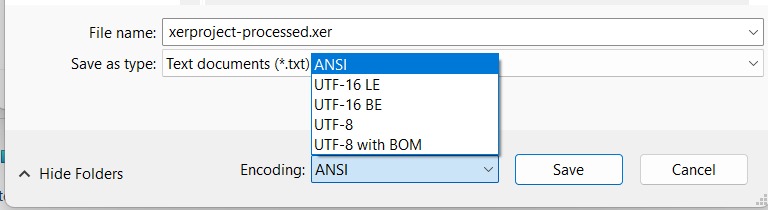
Notice 1: Language Error
For non-English schedules (Arabic, etc.), text might appear corrupted.
To fix this: Open your XER file in **Notepad**, select 'Save As', and choose **ANSI** from the Encoding dropdown menu.
Do not execute outputs from both tools directly; export the project after using each tool before proceeding to the next.
Notice 2: How to Fix Cost Errors
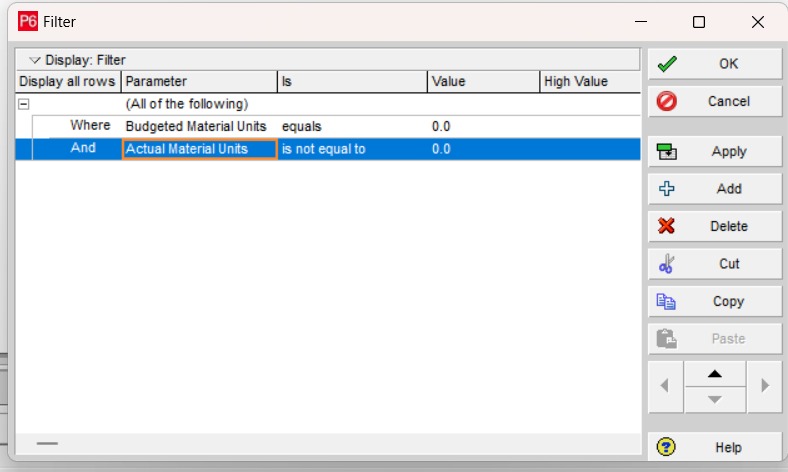
If you find a cost error, check the **Resource Assignment section** for any completed activities.
Look for activities that have Actual Units but Budget Units are 0. Change Budget Units to match Actual Units to resolve the issue.
Notice 3: Verify Split Durations
You should double-check the durations of newly split activities. Some activities may have long durations that are dependent on the original activity duration, which may require manual adjustment.
ملاحظة 1: خطأ في اللغة
لإصلاح النص المشوه: افتح ملف XER في **Notepad**، واختر "Save As" ثم اختر **ANSI** من قائمة الترميز.
يجب تصدير المشروع بعد كل أداة قبل الانتقال للتالية للحفاظ على سلامة البيانات.
ملاحظة 2: كيفية إصلاح أخطاء التكلفة
تحقق من **قسم تخصيص الموارد** للأنشطة المكتملة. إذا كانت الـ Budget Units تساوي 0 والـ Actual Units لها قيمة، قم بتغيير الـ Budget لتطابق الـ Actual.
ملاحظة 3: التحقق من مدد الأنشطة المقسمة
يجب مراجعة مدد الأنشطة الجديدة الناتجة عن التقسيم بعناية، حيث قد تكون مدد بعض الأنشطة طويلة بناءً على مدة النشاط الأصلي، مما قد يتطلب تعديلاً يدوياً.
1 Activity = 1 Point deducted.
Mostafa Elgabalawy
Project Controls Professional
Creator of Creative Fulcrum Tools. Specialized in P6 schedule optimization and project management systems.